
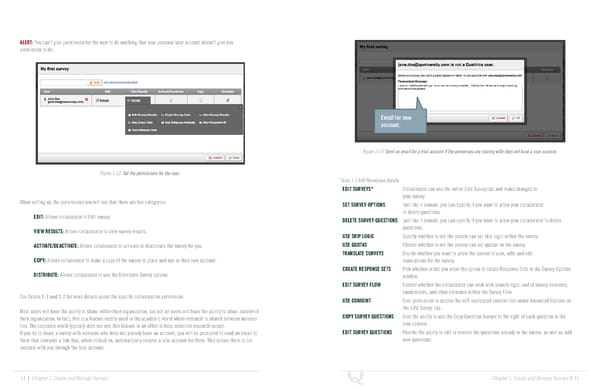
ALERT: You can’t give permission for the user to do anything that your personal user account doesn’t give you permission to do. Email for new account. Figure 1-14 Send an email for a trial account if the person you are sharing with does not have a user account. Figure 1-13 Set the permissions for the user. Table 1-1 Edit Permission Details EDIT SURVEYS* Collaborator can use the entire Edit Survey tab and make changes to your survey. When setting up the permissions you will see that there are five categories: SET SURVEY OPTIONS Just like it sounds, you can specify if you want to allow your collaborator EDIT: Allows collaborator to Edit survey. to delete questions. DELETE SURVEY QUESTIONS Just like it sounds, you can specify if you want to allow your collaborator to delete VIEW RESULTS: Allows collaborator to view survey results. questions. USE SKIP LOGIC Specify whether or not the person can set skip logic within the survey. ACTIVATE/DEACTIVATE: Allows collaborator to activate or deactivate the survey for you. USE QUOTAS Choose whether or not the person can set quotas on the survey. TRANSLATE SURVEYS Decide whether you want to allow the person to view, add, and edit COPY: Allows collaborator to make a copy of the survey to place and use in their own account. translations for the survey. CREATE RESPONSE SETS Pick whether or not you allow the option to create Response Sets in the Survey Options DISTRIBUTE: Allows collaborator to use the Distribute Survey options window. EDIT SURVEY FLOW Control whether the collaborator can work with branch logic, end of survey elements, See Tables 1-1 and 1-2 for more details about the specific collaboration permission. randomizers, and other elements within the Survey Flow. USE CONJOINT Give permission to access the self-explicated conjoint tool under Advanced Options on Most users will have the ability to share within their organization, but not all users will have the ability to share outside of the Edit Survey tab. their organization. In fact, this is a feature mostly used in the academic world where research is shared between universi- COPY SURVEY QUESTIONS Give the ability to use the Copy Question feature to the right of each question in the ties. The corporate world typically does not use this feature in an effort to keep sensitive research secure. blue column. If you try to share a survey with someone who does not already have an account, you will be prompted to send an email to EDIT SURVEY QUESTIONS Provide the ability to edit or remove the questions already in the survey, as well as add them that contains a link that, when clicked on, automatically creates a trial account for them. This allows them to col- new questions. laborate with you through the trial account. 14 | Chapter 1: Create and Manage Surveys Chapter 1: Create and Manage Surveys | 15
 The Complete Research Suite Page 7 Page 9